How to Improve Office to Field Communication: A Practical Guide for Contractors
Communication breakdowns between office staff and field crews cost contractors thousands of dollars every year in wasted time, rework, missed appointments, and frustrated customers. When the office can’t reach field technicians about schedule changes, or when crews can’t quickly update the office about job site issues, the entire operation suffers. Poor office to field communication leads to duplicate trips, incorrect materials ordered, billing errors, and customers left waiting without updates.
For home service and construction businesses, seamless coordination between office and field teams isn’t just convenient—it’s essential for profitability and growth. The challenge is that many contractors work with mixed-age crews, varying levels of tech comfort, and job sites with spotty connectivity. Your communication strategy needs to work for everyone, not just the most tech-savvy team members.
This guide walks you through practical solutions for improving office field coordination, starting with simple, low-tech protocols that work anywhere, then progressing to field service communication tools that can transform your operations. You’ll learn construction communication best practices that address real-world challenges, backup strategies for when technology fails, and how to get buy-in from resistant team members.
Why Office to Field Communication Matters for Your Bottom Line
Poor communication doesn’t just create frustration—it quietly drains your profits every single day. Understanding exactly how these breakdowns impact your bottom line is the first step toward fixing them.
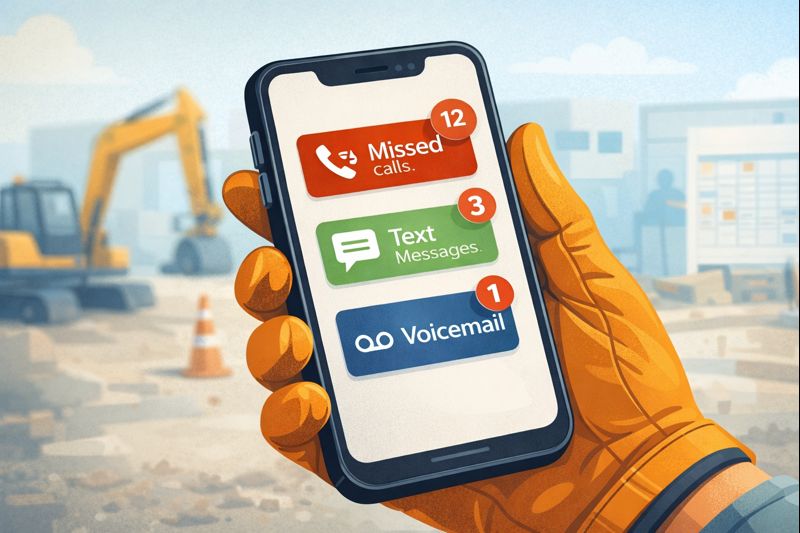
Communication failures add up faster than most contractors realize. When your field crew doesn’t get the right information, they’re burning fuel driving back to the shop or making unnecessary trips to supply houses. You’re paying labor hours for technicians to sit on hold trying to track down details they should already have. Materials get ordered incorrectly, leading to rush reorders at premium prices. Customers start complaining about missed appointments or unexpected delays, and your office staff spends hours firefighting these preventable problems instead of focusing on growth.
Poor communication affects daily operations in ways that ripple throughout your entire day. Your crew arrives at a job site only to discover they don’t have critical access codes or the customer’s specific requirements. Your technicians can’t answer basic customer questions about pricing or timelines because the office never shared that information. Meanwhile, your office staff is promising same-day service to customers without any real visibility into actual field capacity, creating impossible situations for everyone involved.
The competitive advantage of getting it right transforms your entire operation. With effective field service communication tools and processes, you’ll complete jobs faster, handle more work orders with your existing team, and watch your customer satisfaction scores climb. Your employees stay longer because they feel informed and supported rather than constantly scrambling for answers.
When you master real-time updates and streamline your construction communication best practices, you’re not just solving problems—you’re building a reputation that wins you more business.
Understanding What Causes Communication Breakdowns
Before you can fix communication problems between your office and field teams, you need to understand what’s actually breaking down.
Technology gaps create immediate obstacles when your systems don’t match your team’s reality. You’ve got a veteran foreman who’s brilliant at his job but struggles with smartphone apps, or job sites in rural areas where cell coverage drops out completely. When your dispatch software doesn’t talk to your scheduling system, and half your crew is using their personal phones with different capabilities, you’re setting everyone up for failure. Your office sends urgent work order updates through a new app, but your best technician is still checking texts because he never got proper training on the platform.
Process problems multiply confusion across your entire operation. Without standardized protocols, nobody knows who should receive job site updates or when field reporting is actually due. What happens when your primary communication method fails? Most contractors discover they don’t have a backup plan until it’s too late.
Cultural resistance runs deeper than you might think. Your experienced crews may resist new field service communication tools because “we’ve always done it this way,” while younger technicians expect instant messaging. Field teams often feel micromanaged when the office requests frequent check-ins, creating tension that kills open communication.
Information overload versus information gaps creates a frustrating paradox. Your field workers get bombarded with irrelevant group chat messages while critical updates get buried. Meanwhile, your office has zero real-time visibility because there’s no centralized documentation system.
Recognizing these patterns is your first step toward building better mobile workforce management practices that actually work.
What You’ll Need Before Implementing New Communication Systems
Before you jump into new field service communication tools, you need to lay the groundwork properly. Skipping this preparation phase is like starting a job without checking your materials—you’ll end up backtracking later.
Start with an honest assessment of where you stand right now. Walk through a typical day and document exactly how information travels from your office to the field and back again. What are your three biggest headaches? Maybe it’s technicians showing up without the right materials, or your office staff fielding constant “where’s my crew?” calls from customers. Survey everyone—your dispatchers, project managers, and field crews—about what drives them crazy about your current setup. Track some baseline numbers too, like how often you need callbacks or how well crews stick to their schedules.
Getting team buy-in early makes all the difference. Your field supervisors should help choose any new construction communication best practices or software—they know what’ll actually work on job sites. Got some workers who’d rather stick with phone calls? Address those concerns head-on before rolling out changes. Find your natural communication champions, those folks who adapt quickly and can help others during the transition.
Check your basic infrastructure next. Map out cell service coverage across your service area, set up charging solutions in work trucks, and identify backup methods when technology fails.
Finally, block out time for training. Plan for hands-on sessions and simple reference guides your crews can actually use. Don’t expect overnight transformation—give your team space to adjust.
Step-by-Step: Building Your Communication Protocol Foundation
Building strong office to field communication doesn’t require expensive software or complicated systems—it starts with solid protocols that work regardless of technology.
Start with Daily Check-In Rhythms
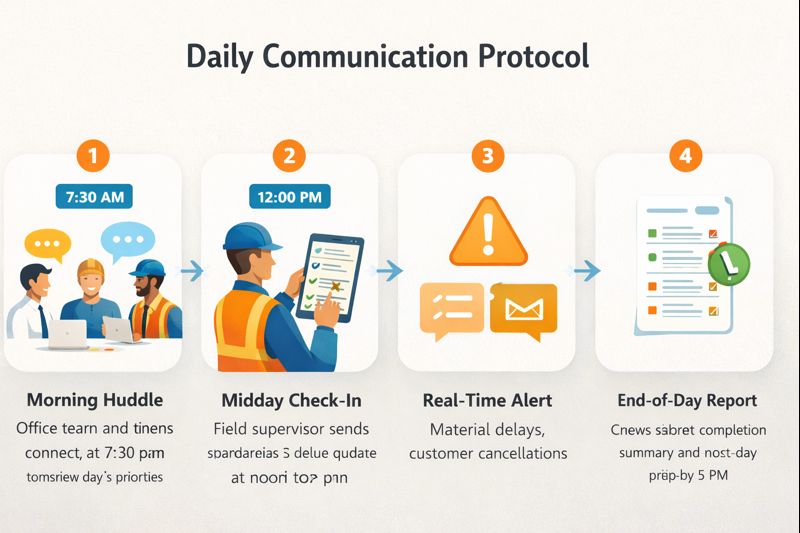
A simple morning huddle protocol—whether that’s a quick phone call or stopping by the office before heading to the first job—sets the tone for the entire day. Establish three expected touchpoints: start of day, midday (usually around lunch), and end of day.
Create a simple status update format that everyone uses consistently, covering current location, job progress, and any issues. Most importantly, define what constitutes an urgent issue requiring immediate contact versus something that can wait until the end-of-day report. This clarity alone eliminates countless “should I call about this?” moments that waste time.
Develop Standardized Communication Templates
Your job site update format should cover the essentials: arrival time, conditions found on site, materials needed, estimated completion time, and any customer concerns that came up. When field teams know exactly what information to provide, improving office field coordination becomes dramatically easier.
Instead of getting a vague text saying “running late,” you’ll receive “Arrived Miller job 45 min late due to parts pickup, customer informed, still finishing by 3pm as promised.” Design similar templates for schedule changes and build an emergency escalation protocol with specific contact methods—this template should work whether someone’s sending a text, making a call, or using your field team communication software.
Implement a Tiered Information System
Define three clear levels: Level 1 for true emergencies requiring immediate response (safety issues, major customer problems), Level 2 for same-day issues needing office support (unexpected material needs, schedule adjustments), and Level 3 for routine updates and documentation.
Assign different communication channels to each level—maybe Level 1 gets a phone call, Level 2 uses text or app notifications, and Level 3 goes into your work order management system. Train everyone on what qualifies for each tier, and establish response time commitments so field teams know when to expect help.
Set Up Backup Communication Methods
Dead zones are a reality of construction work. Identify job sites with known poor cell coverage and establish check-in procedures before entering and after leaving these areas. Provide field teams with office landline numbers and create an “if you don’t hear from me by X time” protocol so the office knows when to check in. For crews working in the same general area with connectivity issues, two-way radios can be lifesavers for real-time updates.
Create a Centralized Information Hub
Whether it’s a physical whiteboard in the office or a digital dashboard, everyone should know where to look for current crew locations, job status, and scheduling. Implement a system where all updates flow to one place—nothing’s more frustrating than checking three different places to find out where your plumber is working today. Ensure both office staff and field teams can access critical customer information and job history when they need it.
Establish Two-Way Communication Expectations
Define acceptable response times for different message types—not everything needs an instant reply. Set boundaries on after-hours communication to prevent burnout.
Train office staff to understand field realities: your technician might have dirty hands, be on a ladder, or be mid-conversation with a customer. Similarly, teach field teams about office constraints like juggling multiple customer calls while coordinating several crews. This mutual understanding transforms construction communication best practices from rules into respect.
With these six steps in place, you’ve built a protocol foundation that will support whatever technology you add later—and work just fine even when that technology fails.

Choosing and Implementing Field Service Communication Tools
Once you’ve established solid communication protocols, the right technology can transform them from good intentions into daily habits that actually stick.
Essential Features in Field Service Communication Software
Your technology should match how your crews actually work, not just look impressive in a demo. Mobile workforce management capabilities are non-negotiable—your team needs to access everything from their phones while standing on a job site. Offline functionality matters more than you might think, especially if your projects take you to rural areas or inside concrete buildings where cell signals disappear.
Look for a simple interface requiring minimal training, because even the most powerful software is worthless if your crew won’t use it. Integration with your existing scheduling or accounting systems saves you from double-entry headaches, while photo and document sharing helps everyone stay on the same page. GPS and location features make dispatch decisions faster and smarter when you can see exactly where each crew is working.
Evaluating Tools Based on Business Size
Sole proprietors and small teams with 2-5 field workers often do just fine with shared calendaring and group messaging—you don’t need to overcomplicate things. Medium operations running 6-20 workers typically hit a breaking point where dedicated dispatch software and digital work orders become essential for maintaining sanity. Larger companies need full field service management platforms with automated crew scheduling and field reporting to keep dozens of moving parts coordinated.
Implementation Strategy That Minimizes Disruption
Pick one crew or job type as your pilot program rather than forcing everyone to change at once. Run the new system parallel with your old methods for a few weeks so nothing falls through the cracks during the transition. Gather feedback from actual users and adjust settings before the full rollout—the office manager and the guy swinging a hammer often have very different perspectives on what works.
Training Approaches for Mixed Tech-Comfort Levels
Not everyone grew up with a smartphone in their hand. Pair tech-comfortable workers with resistant ones so learning happens naturally throughout the day. Focus on “what’s in it for me” benefits for each role—show dispatchers how they’ll stop playing phone tag, and show field techs how they’ll avoid end-of-day paperwork.
Popular Field Service Communication Tools
All-in-one platforms like ServiceTitan, Housecall Pro, and Jobber handle everything from scheduling to invoicing. Simple messaging and scheduling tools like Crew, Connecteam, and TSheets focus on doing a few things really well. Project management platforms like Procore, Buildertrend, and CoConstruct shine on larger construction projects. Communication-specific options like Slack or Microsoft Teams with field extensions work great if you already use them in the office.
The secret is choosing based on your biggest pain point rather than chasing the longest feature list.

Common Communication Mistakes and How to Avoid Them
Even well-intentioned contractors stumble into predictable communication traps that derail their office to field communication. Recognizing these mistakes early can save you from frustration, wasted money, and crew turnover.
Technology Before Protocols
This remains the most expensive mistake. A contractor spends thousands on field service management software, rolls it out to the team, and within weeks everyone’s back to phone calls and text messages. The problem? Fancy field service communication tools can’t fix unclear processes; they just digitize the chaos faster.
Before shopping for dispatch software or mobile workforce management platforms, map out exactly how information should flow in your company. Define who needs to know what, when they need to know it, and what decisions each person can make independently.
One-Way Communication Habits
Treating experienced technicians like order-takers instead of the problem-solvers they are misses critical insights. When your office staff only broadcasts instructions without asking for input, you’re missing valuable job site updates from the people who actually see customer reactions and unexpected conditions.
Build feedback loops into your daily routine—ask your field teams what they learned today, what problems they spotted, and how processes could improve. This transforms field reporting from a chore into genuine collaboration.
Information Overload Through Micromanagement
Constantly texting “Where are you now?” or “What’s your status?” signals distrust and interrupts focused work. Instead, establish clear check-in schedules that everyone agrees to, then step back between those checkpoints. Focus your communication on exceptions—problems that need immediate attention—rather than routine updates that could wait.
No Backup Communication Plan
This leaves you helpless when phones die or crews enter areas with no signal. Always identify a secondary contact method, whether that’s a vehicle-mounted tablet, a job site landline number, or a designated check-in location. Teach crews to proactively communicate before entering known dead zones.
Ignoring the Human Element
When you force new work order management tools without addressing concerns or providing adequate training, people dig in their heels. Slow down, listen to specific objections, and adjust your timeline based on real feedback.
When communication inevitably breaks down, have a recovery plan ready. If a crew goes dark unexpectedly, follow your escalation protocol calmly rather than panicking. After any incident, conduct a brief review focused on prevention, not blame. Building this kind of psychological safety encourages people to report problems early rather than hiding them until they explode.
Construction Communication Best Practices from Successful Contractors
The difference between good contractors and great ones often comes down to the small, consistent practices they’ve refined over years of trial and error. Here are field-tested strategies that successful contractors use to keep their office and field teams in perfect sync.
The Morning Photo Protocol
Have your field crews snap and send photos of job site conditions the moment they arrive—before they even unload their trucks. This simple habit immediately surfaces unexpected situations like weather damage, missing materials, or access problems while there’s still time to adjust the day’s plan. It also provides ironclad documentation for billing disputes and keeps your office informed without lengthy phone calls. Whether your team uses basic text messages or dedicated field service management platforms, this practice works for everyone.
End-of-Day Voice Memos
Instead of asking technicians to type lengthy explanations on tiny phone screens, have them record 60-90 second voice messages while driving between jobs or heading home. These recordings capture the nuance and detail that text misses—you can hear the frustration about a delayed delivery or the excitement about finishing ahead of schedule. Your office staff can listen at 1.5x speed to save time, and this approach is particularly effective for experienced workers who are uncomfortable with typing but have valuable insights to share.
The Closed Loop Confirmation System
Any schedule change, material request, or important instruction must receive confirmation from the recipient—whether through read receipts, a quick “got it” reply, or a thumbs-up emoji. This creates accountability on both sides and takes just seconds to implement through your existing crew scheduling tools.
Weekly Communication Audits
Spend just 15 minutes each Friday reviewing what communication breakdowns happened during the week. Did three crews show up without the right permits? Did customers complain about not knowing when technicians would arrive? Identify these patterns, celebrate what went right, and make small adjustments continuously rather than waiting for major problems to force changes.
Customer Update Automation
Modern dispatch software can automatically trigger customer notifications when your field technician starts driving to their location, completes the job, or generates an invoice. This reduces endless phone tag, dramatically improves customer experience, and frees your office staff to focus on higher-value work instead of making routine status calls all day.
The Emergency Bypass Protocol
Designate specific phone numbers or contact methods that bypass your normal work order management channels—but use them sparingly to maintain their urgency. Define exactly what qualifies as an emergency: safety issues, major equipment failure, or angry customer escalations that could damage your reputation. Make sure someone is available 24/7 for these critical paths, because when a crew hits a gas line or a customer is threatening to call the news, you need immediate response capability.
These construction communication best practices aren’t complicated, but they require commitment and consistency to deliver results.

Measuring Success and Continuous Improvement
Even the best communication system won’t help if you’re not tracking whether it’s actually working. The good news? You don’t need fancy analytics to know if your efforts are paying off.
Key Metrics That Matter
Start watching for reduced callbacks where crews need missing information, decreased fuel costs from fewer unnecessary trips back to the office, and improved first-time fix rates. When your field service management system is humming, you’ll also notice faster average job completion times and reduced overtime from better crew scheduling. Don’t forget to track customer satisfaction scores, especially comments about communication and timeliness—these often reveal problems before they become expensive.
Feedback Mechanisms Catch Problems Early
Try monthly pulse surveys with your field crews asking just three or four targeted questions about communication challenges. Schedule regular office staff debriefs to discuss what’s tripping people up with work order management or job site updates. Customer feedback analysis often reveals gaps you didn’t know existed—like technicians not explaining delays clearly, even though the office is sending real-time updates.
Quarterly Communication Reviews
Set aside time to assess what’s working with your field service communication tools and what needs adjustment. Update protocols based on lessons learned, and don’t be afraid to retire processes that aren’t adding value. This is also the perfect time to recognize teams excelling at technician communication and share their success stories.
Scaling Your System
Your communication needs when you have five field workers look completely different at twenty. As you grow, you’ll eventually need to upgrade from basic dispatch software to enterprise mobile workforce management solutions. The key is maintaining your communication culture during rapid growth and ensuring new hires understand your established protocols from day one.
Conclusion
Improving office to field communication doesn’t require a complete technology overhaul or massive budget. The most successful contractors start with simple, practical protocols that work for their specific team, then layer in field service communication tools that support those processes.
By establishing clear check-in rhythms, standardized update formats, tiered urgency systems, and backup methods, you create a foundation that works regardless of technology.
Start this week by identifying your single biggest communication pain point—maybe it’s schedule changes not reaching crews, or field teams unable to quickly request materials, or customers left without updates. Implement one simple protocol to address that specific issue. Get feedback from both office and field teams after two weeks, adjust as needed, then tackle the next challenge. This incremental approach builds momentum and proves value without overwhelming your team.
Remember that perfect communication is impossible, but consistent improvement is always within reach. The goal isn’t to eliminate every miscommunication, but to build systems and habits that catch and resolve issues quickly. As your office field coordination improves, you’ll find your entire operation running more smoothly—fewer frustrated customers, less stressed employees, and better profitability.
Frequently Asked Questions
How long does it take to improve office to field communication?
Simple protocol improvements show results within 1-2 weeks as teams adopt new check-in rhythms and standardized update formats. Technology implementation typically requires 3-4 weeks for training, adjustment, and full adoption across all team members. Cultural change and habit formation takes 2-3 months before new communication practices become automatic. Factors affecting timeline include team size, current technology comfort levels, complexity of operations, and leadership commitment to change.
What tools help office staff communicate with field workers most effectively?
Start with what you have: phone calls, text messages, and group messaging apps work for many small operations without additional investment. Mid-sized operations benefit from dedicated field service communication tools like Crew, Connecteam, or Jobber that combine scheduling, messaging, and work orders. Larger contractors typically need comprehensive field service management platforms like ServiceTitan, Housecall Pro, or Procore that integrate all operational aspects. The best tool is the one your entire team will actually use consistently—simple and adopted beats sophisticated and ignored.
How do you reduce miscommunication between office and job site?
Establish standardized formats for common communications so everyone knows what information to include and expects to receive. Implement closed-loop confirmation where recipients acknowledge receipt and understanding of important messages. Create tiered urgency systems so teams know which messages need immediate attention versus end-of-day review. Build in redundancy with backup communication methods for critical information and connectivity dead zones.
What’s the best way to handle communication when field crews are in areas with no cell service?
Establish pre-entry and post-exit check-in protocols where crews communicate before entering and immediately after leaving dead zones. Provide comprehensive job information before crews depart so they have everything needed to complete work independently. Create ‘if you don’t hear from me by X time’ agreements so office knows when to be concerned versus when silence is expected. Consider two-way radios for crews working in the same geographic area or satellite communication devices for truly remote locations.
How can field technicians quickly update the office about job site issues?
The morning photo protocol where crews send pictures upon arrival immediately surfaces unexpected conditions. Voice memos allow technicians to provide detailed updates while driving without typing lengthy messages. Pre-built status templates in field service apps enable one-tap updates for common situations. Establish which updates can wait until end-of-day versus which require immediate office notification to avoid over-communication.
How do you train older field workers who resist new communication technology?
Start with one simple feature that solves a real pain point for them personally, demonstrating immediate value before adding complexity. Provide one-on-one hands-on training rather than group sessions, allowing individuals to learn at their own pace without embarrassment. Pair tech-comfortable workers with resistant ones for peer mentoring, which often works better than top-down instruction. Maintain backup low-tech options during transition so no one feels forced to sink or swim with new technology.
What’s the most important thing to remember when improving office field coordination?
Establish clear communication protocols before investing in technology—software can’t fix unclear processes, it just digitizes the confusion. The single most critical success factor is getting buy-in from field supervisors and lead technicians who influence crew adoption of new methods. Make communication two-way by genuinely listening to field feedback rather than treating crews as order-takers who just need better instructions. Start small with one pain point and one solution, prove value, then expand—trying to fix everything at once overwhelms teams and fails.